

Type Inference and Basic Types in Kotlin

Introduction
In our first post, we explored a small Selenium test written in Kotlin and highlighted several language features that make test code more concise and expressive. But there was one feature working behind the scenes that we didn't explicitly call out: type inference.
If you copied the example into IntelliJ IDEA and had Function return types inlay hints enabled (Settings → Editor → Inlay Hints → Types → Kotlin → Function return types), you might have noticed the Unit keyword appearing after the login function signature:
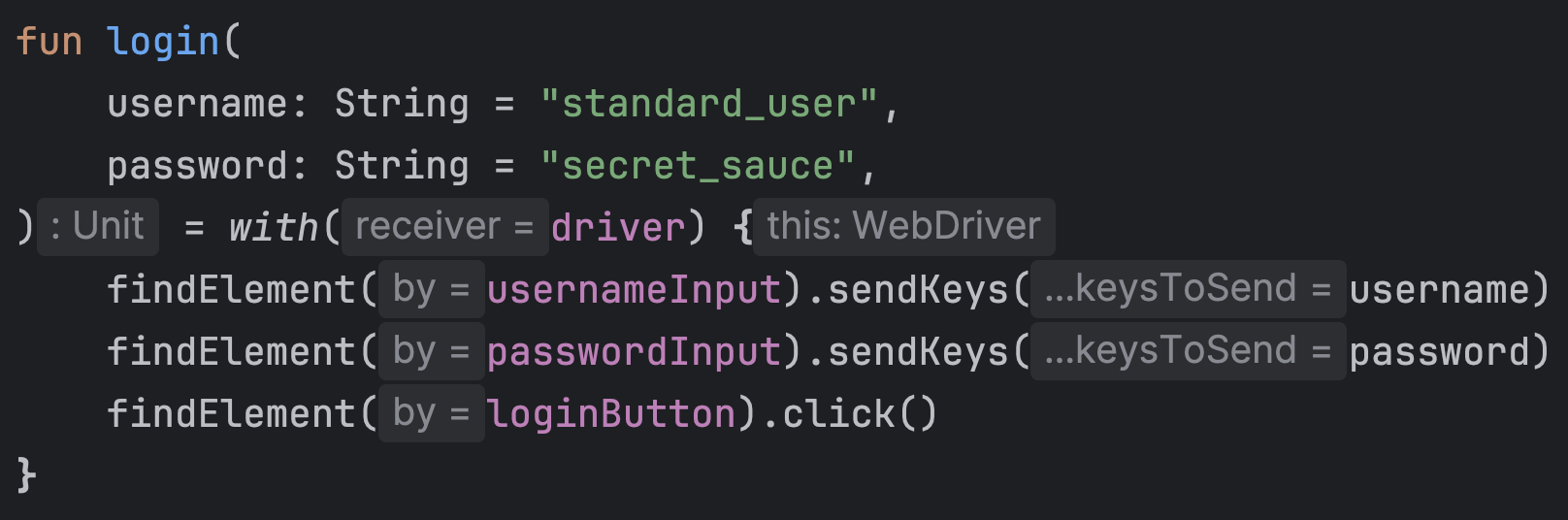
In this post, we'll explore what type inference is, how it works in Kotlin, and cover the basic types you'll encounter most frequently when writing test automation code. Understanding these fundamentals will make the rest of your Kotlin journey much smoother.
What is Type Inference?
Type inference means the compiler can automatically figure out the type of a variable or function return based on the value or expression you provide. You don't have to explicitly declare the type every time — the compiler does that work for you.
Let's start with a simple comparison:
- Kotlin
- Java
// Explicit type annotation
val username: String = "standard_user"

// Type inference - compiler figures it out
val username = "standard_user"  // inferred as String
// Java always requires explicit type declaration
String username = "standard_user";

// Or with var (Java 10+)
var username = "standard_user";  // inferred as String
In Kotlin, when you assign a value to a variable declared with val or var, the compiler looks at the right-hand side of the assignment and determines the type automatically. This works for all types:
val count = 5                    // inferred as Int
val price = 19.99                // inferred as Double
val isValid = true               // inferred as Boolean
val driver = ChromeDriver()      // inferred as ChromeDriver
val locator = By.id("username")  // inferred as By
Why this matters: Less typing, less noise, and faster test writing. Your code stays readable while you focus on test logic rather than type declarations.
Remember: val declares a read-only variable (immutable reference), while var declares a mutable variable that can be reassigned.
Function Declaration Syntax
Before we dive deeper into type inference, let's understand Kotlin's function declaration syntax. This will help clarify how inference works with functions.
Function declarations start with the fun keyword, followed by the function name. Then comes the parameter list in parentheses. In Kotlin, unlike Java, we write the parameter name first, followed by a colon and its type:
fun login(username: String, password: String)
As we saw earlier, you can also specify default parameter values after an equal sign:
fun login(
    username: String = "standard_user",
    password: String = "secret_sauce",
)
Finally, the return type follows the parameter list, separated by a colon:
fun getTitle(): String {
    return "Swag Labs"
}
For functions that don't return a meaningful value, Kotlin uses the Unit type:
fun login(
    username: String = "standard_user",
    password: String = "secret_sauce",
): Unit {
    // ...
}
Unit is Kotlin's equivalent of Java's void — but unlike void, Unit is an actual type with a single value. This keeps Kotlin's type system consistent (every function returns something).
Type Inference for Functions
Now that we understand function syntax, let's see how type inference applies to functions.
Return Type Inference
Kotlin can infer the return type of a function in two scenarios:
1. Expression-body functions
When a function consists of a single expression, you can use the = syntax, and Kotlin infers the return type:
// Explicit return type
fun getTitle(): String = "Swag Labs"

// Inferred return type
fun getTitle() = "Swag Labs"  // compiler infers String
This is the style you saw in the first post:
fun login(
    username: String = "standard_user",
    password: String = "secret_sauce",
) = with(driver) {
    findElement(usernameInput).sendKeys(username)
    findElement(passwordInput).sendKeys(password)
    findElement(loginButton).click()
}  // return type inferred as Unit
2. Block-body functions with explicit return
For functions with a block body ({ ... }), Kotlin can still infer the return type if there's a single return statement:
fun getTitle() {
    return "Swag Labs"  // compiler infers String
}
However, for readability and API clarity, many teams prefer explicit return types for public functions:
fun getTitle(): String {
    return "Swag Labs"
}
Understanding Unit in Depth
When a function doesn't return a meaningful value, Kotlin infers Unit as the return type:
// Explicit Unit (rarely needed)
fun login(): Unit {
    driver.findElement(loginButton).click()
}

// Unit is inferred - this is the idiomatic way
fun login() {
    driver.findElement(loginButton).click()
}

// Even with expression body
fun login() = driver.findElement(loginButton).click()  // Unit inferred
Why Unit matters: You'll rarely write Unit explicitly — the compiler handles it automatically. Just know that functions without explicit return values are typed as Unit, not void. This distinction becomes relevant when you start using higher-order functions (functions that take other functions as parameters), which we'll cover in a future post.
Basic Types in Kotlin
Kotlin has a straightforward type system with types that will feel familiar if you're coming from Java. Here are the ones you'll use most often in test automation:
Numbers
// Integers
val timeout = 30                    // Int (32-bit)
val largeNumber = 1_000_000L        // Long (64-bit), note the L suffix

// Floating-point
val price = 29.99                   // Double (64-bit)
val discount = 0.15f                // Float (32-bit), note the f suffix

// Underscores for readability!
val population = 7_900_000_000L
val creditCard = 1234_5678_9012_3456L
The underscore separator (_) is great for making long numbers readable — especially useful for things like timeout values in milliseconds: val timeout = 30_000 (30 seconds).
Text
// Strings
val username = "standard_user"
val url = "https://www.saucedemo.com"

// Characters
val initial: Char = 'A'             // Single character, must use single quotes
Boolean
val isEnabled = true                // Boolean
val isVisible = false
val testPassed = driver.title == "Swag Labs"
A Note on Type Hierarchy
Unlike Java, where primitives (int, double, boolean) are different from their wrapper classes (Integer, Double, Boolean), Kotlin doesn't have primitive types at the language level. Everything is an object:
val count = 5 // This looks like an object, behaves like an object
Behind the scenes, Kotlin compiles to efficient JVM bytecode and uses Java primitives when possible, but you don't have to think about this distinction. This makes the type system simpler and more consistent.
Type Inference Best Practices
Type inference is powerful, but knowing when to use it — and when to be explicit — will make your test code clearer and more maintainable.
When to Use Type Inference
1. Local variables where the type is obvious
val driver = ChromeDriver()              // Clear from the constructor
val loginButton = By.id("login-btn")     // Clear from the method
val isVisible = element.isDisplayed()    // Clear from method return
2. Function returns with expression bodies
fun getWelcomeMessage() = "Welcome to Swag Labs"
fun calculateTotal() = price * quantity
fun isLoggedIn() = driver.findElements(By.id("logout")).isNotEmpty()
3. Simple initializations
val count = 0
val timeout = 30_000
val retries = 5
When to Declare Types Explicitly
1. Public API boundaries
For functions that others will call (especially in page objects or utility classes), explicit return types improve readability:
// Good - clear API contract
fun getCurrentUrl(): String {
    return driver.currentUrl
}

// Less clear - what does this return?
fun getCurrentUrl() {
    return driver.currentUrl
}
2. When the inferred type is too specific
Sometimes inference gives you a concrete type when you want to work with an interface:
// Too specific - inferred as ChromeDriver
val driver = ChromeDriver()

// Better for flexibility - declared as WebDriver interface
val driver: WebDriver = ChromeDriver()

// Now you can easily switch to Firefox:
val driver: WebDriver = FirefoxDriver()
3. When inference would be ambiguous or confusing
// What type is this? Not immediately clear
val result = processData(input)

// Better - explicit for clarity
val result: TestResult = processData(input)
A Balanced Approach
A good rule of thumb: use type inference for local variables and short functions where the type is immediately obvious from context. Use explicit types for public APIs, interfaces, and anywhere that improves clarity.
Your IDE will help — if IntelliJ shows the inferred type in gray (inlay hints), and it's exactly what you expected, inference is probably fine. However, if the inferred type isn't immediately obvious from reading the code, make it explicit. This becomes especially important during GitHub code reviews where inlay hints aren't available. Remember: code is read far more often than it's written.
Make sure that both Property types and Function return types inlay hints are enabled in IntelliJ (Settings → Editor → Inlay Hints → Types → Kotlin).
Bringing It Together: Revisiting Our First Example
Now that we understand type inference and basic types, let's revisit the code from our first post with fresh eyes:
class LoginPage(private val driver: WebDriver) {
    private val usernameInput = By.name("user-name")      // Type inferred as By
    private val passwordInput = By.id("password")         // Type inferred as By
    private val loginButton = By.name("login-button")     // Type inferred as By

    fun login(
        username: String = "standard_user",               // Explicit String type
        password: String = "secret_sauce",                // Explicit String type
    ) = with(driver) {                                     // Return type inferred as Unit
        findElement(usernameInput).sendKeys(username)
        findElement(passwordInput).sendKeys(password)
        findElement(loginButton).click()
    }
}

class SeleniumTest {
    private lateinit var driver: WebDriver                // Explicit WebDriver interface

    @BeforeEach
    fun setUp() {                                          // Return type inferred as Unit
        driver = ChromeDriver().apply {
            get("https://www.saucedemo.com")
        }
    }

    @AfterEach
    fun tearDown() {                                       // Return type inferred as Unit
        driver.quit()
    }

    @Test
    fun `taste of Kotlin`() {                              // Return type inferred as Unit
        LoginPage(driver).login()
        assert(driver.title == "Swag Labs")
    }
}
What's inferred:
- Locator fields (
usernameInput,passwordInput,loginButton) - all inferred asBy - Function return types for
login(),setUp(),tearDown(), and the test - all inferred asUnit
What's explicit:
- Function parameter types (
username: String,password: String) - The
driverfield type (WebDriver) — intentionally using the interface rather than the concreteChromeDrivertype
This balance of inference and explicit types keeps the code concise without sacrificing clarity.
What's Next
Now that you understand type inference and basic types, you have the foundation to explore one of Kotlin's most important features: null safety. In the next post, we'll dive into:
- Nullable vs. non-nullable types
- Platform types and how they interact with Java libraries like Selenium
- Safe calls, the Elvis operator, and other null-handling techniques
- How
lateinit(which we've been using for ourdriverfield) fits into the picture
Kotlin's approach to null safety is one of its biggest advantages over Java, especially in test automation where NullPointerExceptions can lead to flaky tests and frustrating debugging sessions.
Summary
In this post, we covered:
- Type inference - how Kotlin automatically determines types from context
- Function declaration syntax - including parameter types and return types
- The Unit type - Kotlin's equivalent of void, but better
- Basic types - numbers, strings, booleans, and their relationship to Java types
- Best practices - when to use inference vs. explicit type declarations
Type inference isn't just about writing less code — it's about writing clearer code that focuses on intent rather than ceremony. Combined with Kotlin's straightforward type system, you have the tools to write test code that's both concise and maintainable.
In the next post, we'll tackle null safety, one of Kotlin's killer features that helps prevent entire classes of runtime errors.